
Trusted By Ecommerce Businesses to Boost Efficiency





-1.webp)


-1.webp)








%20(1)-1-1.webp)
How 1-Click Product Imports Work
1. Connect your supplier
Spark pulls in your supplier’s catalog via API, EDI, FTP, or file feeds and builds a structured product catalog.
-1.png?width=388&height=380&name=KAL019-Spark-Shipping-Dropship%20Auto%20Parts%20Suppliers%20Page-02%201%20(1)-1.png)
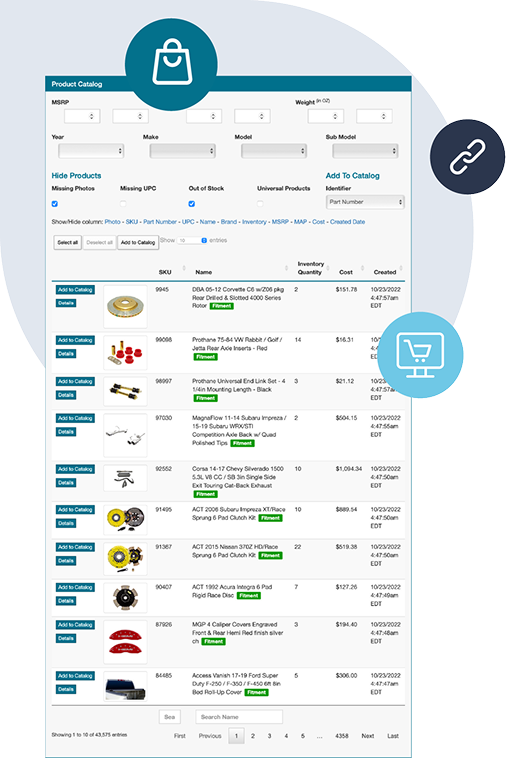
2. Browse and filter products
Search and filter thousands of products by category, brand, type, and attributes.

3. Import with one click
Select a product, and Spark will automatically create a listing, import product data and specifications, upload images, and apply pricing rules.
-1.png?width=388&height=380&name=KAL019-Spark-Shipping-Dropship%20Auto%20Parts%20Suppliers%20Page-02%201%20(2)-1.png)
4. Go live faster
Products are ready in your store without extra setup, so you can focus on choosing what to sell—not creating listings.
.png?width=388&height=380&name=KAL019-Spark-Shipping-Dropship%20Auto%20Parts%20Suppliers%20Page-02%201%20(3).png)
Built for large supplier catalogs
Spark is built to handle large supplier catalogs, including:
- Automotive
- Electronics
- Medical supplies
- Multi-category vendors
- Any industry
Whether you’re importing 10 products or 10,000, the process stays the same.

Launch Products and Scale Faster With 1-Click Imports

Launch products faster
Reduce the time it takes to launch new products from hours to minutes.
Reduce manual errors
Eliminate copy-paste mistakes in SKUs, pricing, and product details.
Add more products without increasing your workload
Expand your product range without increasing manual workload.
Spend time on product selection, not setup
Spend less time building listings and more time driving revenue.
Works Seamlessly with Your Automation Stack
1-click product imports are just the starting point. Once products are in your store, Spark takes over the ongoing work, automating the rest of your workflow:

Enhance Your Product Listings
Spark Shipping provides tools to refine and optimize the products you import, so you can improve listings at scale.


-

 "Choosing Spark Shipping was a game-changer... What stood out was their range of pre-existing integrations and their openness to new ones—it never took more than 30 days. This quick integration is quite exceptional in the industry."Paul Andrew, CEORead Full Case Study
 -
 "Spark Shipping has made my business pretty much run on autopilot... The orders come in, get processed, sent to my suppliers, and the tracking is sent back. I never have to worry about inventory levels.Burt WheelerRead Full Case Study
 -
 "The most appealing part was the ability to automate all of my dropship orders. Their help has resulted in a dramatic decrease in the human labor needed to keep our order flow going."Sam FineRead Full Case Study
 -
 "We were looking for a company that could do custom API integrations with our dropshippers... Spark Shipping automated and simplified the flow of order, tracking, and inventory data, saving staff hours."Read Full Case Study